
Efficient document creation in Dynamics 365 Sales – with and without DocumentsCorePack
Share:
![[Translate to English:] Einfaches erstellen von Dokumenten in Dynamics dankDocumentCorePack](/fileadmin/_processed_/b/2/csm_Einfaches-Arbeiten-Dank-DocumentCorePack_2109f7a780.jpg)
Friday afternoon, 3 p.m.: A customer is waiting for a quote that needs to be sent out quickly before the weekend.
The data is in the CRM, the template is ready, but it's still taking time. First, the tables don't fit, then text modules have to be removed manually, the sections are static, and logic is missing. In the end, everything is copied, adapted, corrected, checked, and checked again.
When it comes to document creation in Dynamics 365 Sales, Microsoft's CRM system offers good basic functionality. But in many companies, everyday experience shows that as soon as a document is more than just “standard,” Word templates quickly reach their limits. This is exactly where it is decided whether your documents are created smoothly or become a recurring time-consuming task.
In this article, we show how the functions of Dynamics 365 Sales and DocumentsCorePack (DCP) differ, what challenges arise in everyday business life, and when the use of DCP is particularly worthwhile.
Document creation in Dynamics 365 Sales – good for the standard
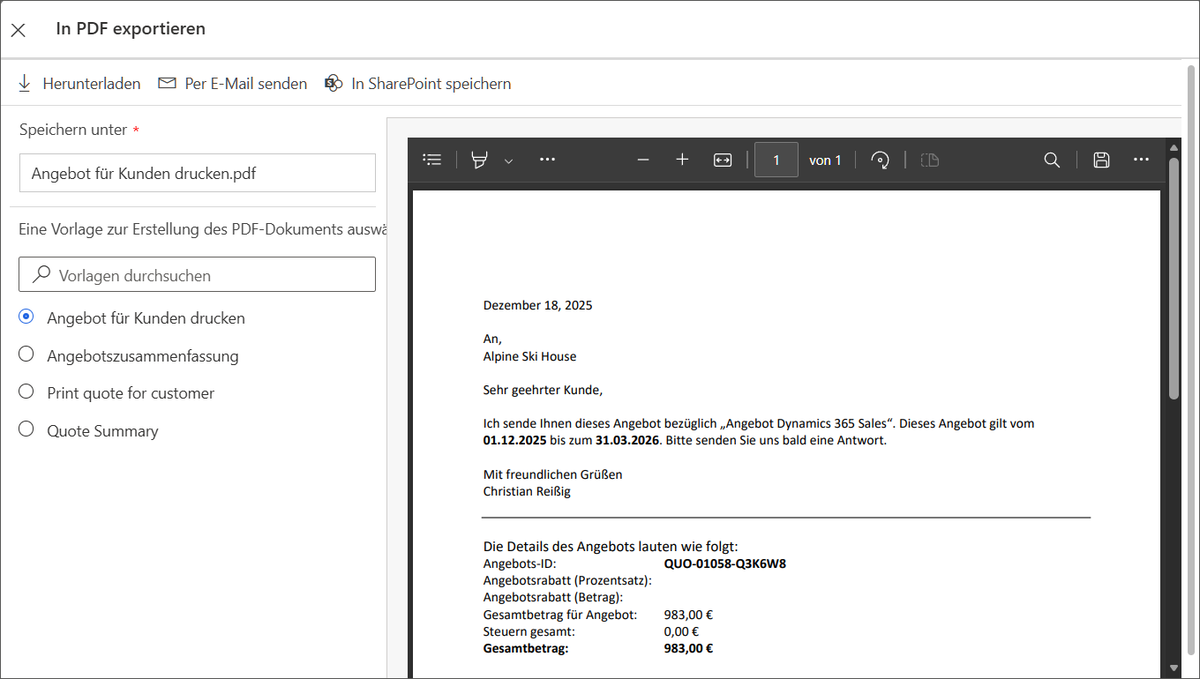
At this point, however, there is no reason to consider an extension right away. Microsoft CRM offers good basic functions for document creation. And these are completely sufficient for everyday sales activities in many companies. Quotes, simple contracts, or PDF outputs can be generated quickly and without additional tools, directly from the CRM.
Dynamics 365 Sales offers an integrated basis for simple documents:
- Quotation overviews
- Simple contract templates
- Standardized PDF generation
In addition, Microsoft's CRM system offers further strengths:
- Immediately available, no additional installation required
- Easy to get started, ideal for basic requirements
- Cost-efficient, no additional licenses
- Directly anchored in the CRM
However, as soon as multi-level layouts, special representations of items, or more complex logic are required, the standard functions reach their limits. Above all, the rigid table structures and limited logic in Word templates make the creation of sophisticated documents very time-consuming.
Where the challenges of real everyday life begin
When documents become more individualized or variable, everyday project work often involves significantly more effort than expected. Many requirements arise repeatedly and cannot be optimally mapped with the existing functions in Dynamics 365 Sales. Typical examples of this are:
1. Groupings of items
In practice, items often need to be grouped by category, product family, service type, or pricing logic rather than simply listed one after the other. Dynamics can output tables, but it is not able to generate such groupings or subtotals on its own.
Example: Products need to be grouped by category, product family, service type, or pricing logic.
2. Conditional content and logic
Many documents contain text, sections, or clauses that should only appear under certain conditions. This is where the native functions quickly reach their limits, because more complex if-then logic, nested conditions, or dynamic text modules can hardly be mapped without additional solutions.
Example:
- Contract clauses should only appear if product X is included.
- Discount ranges generate different wording depending on the amount.
3. Multi-level, varying document structures
Especially in the case of extensive offers or contracts, a document rarely has a fixed structure. Multiple sections, optional chapters, attachments, or variable building blocks are part of everyday life. Without flexible template logic, this quickly leads to manual work—and thus to error-prone and time-consuming processes.
Example: A contract consists of a dynamic main section, product-specific appendices, and optional add-on modules that must be shown or hidden depending on the customer.
Where DCP excels – and why it is indispensable for complex requirements
This is exactly where DocumentsCorePack (DCP) comes in. The add-on expands the existing capabilities in Dynamics 365 Sales so that even complex, dynamic, or multi-level documents can be created reliably and automatically.
1. Flexible and powerful template logic
A key advantage of DCP lies in the way templates are structured. Instead of rigid Word templates, the add-on enables a highly flexible and rule-based structure that adapts precisely to company and product logic.
DCP enables:
- Groupings
- Multi-level conditions
- Nested tables
- Dynamic sections
- Multiple data sources (1:N, N:N relationships)
- PDFs, attachments, and more
The templates are still created in Microsoft Word – but with an add-in that makes CRM data, repeat areas, conditions, and logic available directly in the editor.
2. Automated workflows via the DCP dialog
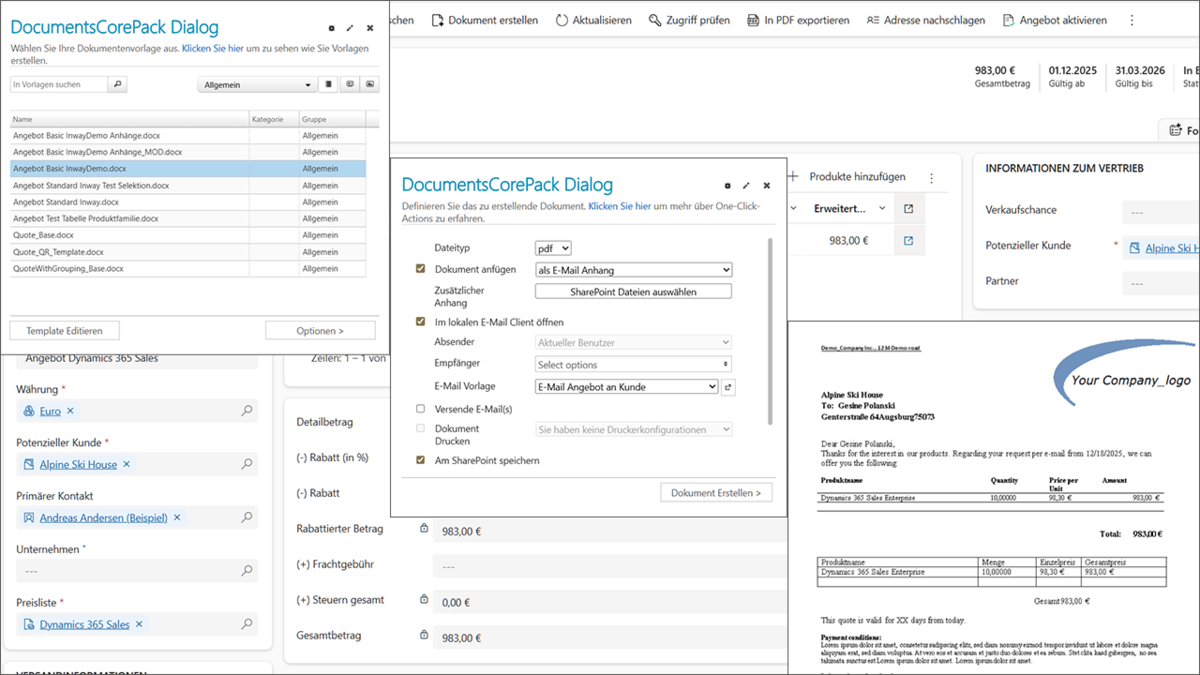
In addition to flexible template logic, automation plays a central role. The DCP dialog not only creates documents, but also processes them immediately – without any manual intermediate steps.
The DCP Dialog enables
- Generate documents,
- save them as PDFs,
- send them by email,
- automatically store them in CRM or SharePoint, and
- initiate further follow-up actions such as workflows or cloud flows.
In the sales process in particular, this results in noticeably less routine work, shorter throughput times, and consistently error-free document creation.
Typical use cases where DCP shows its full potential
DCP really shows its added value when documents are structured, variable, or data-driven. The following document types in particular demonstrate how versatile DCP can be:
1. Offers
- Dynamic position tables
- Bundling of services
- Different layouts depending on product groups
- Optional modules and attachments
2. Orders
- Automatic further processing of an offer
- Link between VKC → quote → order
- Automatic PDF dispatch to customer and internal sales department
3. Contracts
- Variable clauses depending on industry or customer type
- Automatic generation of individual contract sections
- Precise structuring across multiple levels
- Easy maintenance thanks to Word-based templates
1. Power Automate Connector – Automation at the touch of a button
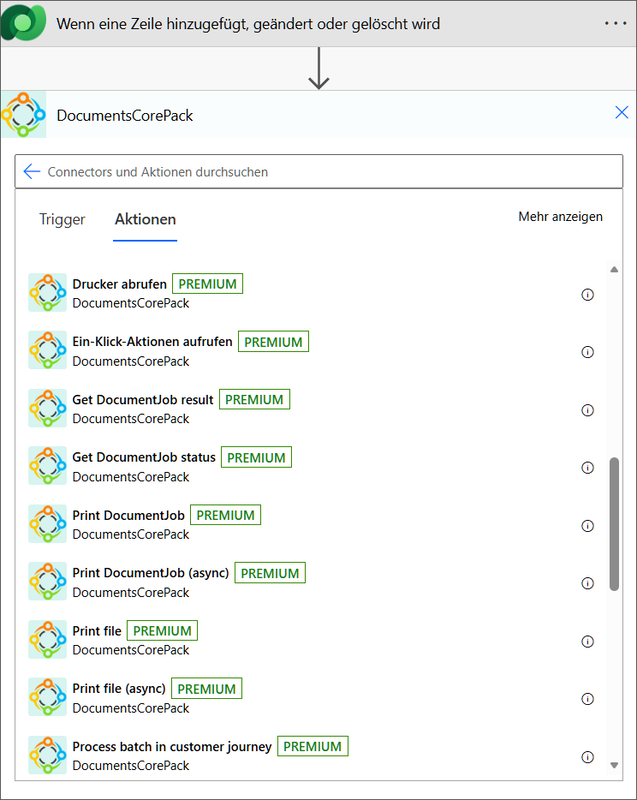
DCP offers a certified Power Automate Connector with over 25 actions. This allows you to not only create your documents fully automatically, but also convert, save, or send them – without any manual intervention.
Typical automations:
- Automatic creation of a quote PDF when the status changes
- Storage in SharePoint in a dynamically generated folder
- Automated email dispatch to customers, sales, or back office
- Batch creation of multiple documents in the background
This makes DCP a true automation platform that goes far beyond mere document creation.
2. Integration of e-signatures — sign digitally without media discontinuity
By integrating DocuSign, Adobe Sign, and AssureSign, the entire signature process can be automated directly from DCP.
A document is
- created,
- forwarded for signature,
- signed,
- transferred back to the CRM,
- and finally archived.
All of this happens completely without manual intervention, ensuring a seamless, media disruption-free process.
3. Modern Template Designer — now also for Word Online & Mac
The new DCP Template Designer works across platforms and devices — in Word Desktop (Windows), Word Online, and Word for Mac. This allows you to edit your templates regardless of location, device, or operating system. This gives you and your employees significantly more flexibility in your daily work.
4. Comprehensive template management and versioning
With comprehensive template management and versioning capabilities, DCP is also ideal for larger organizations and formally structured IT environments. Not only can you version your templates, you can also transfer them between development, test, and production environments and assign specific permissions. Any changes can be traced at any time.
5. Intelligent storage & SharePoint integration
Documents are also stored automatically in DCP—with dynamic folder structures, automatic folder creation, logical storage paths depending on customer, process, or date, and audit-proof archiving. This means that DCP also meets key compliance and documentation requirements in many companies.
Dynamics provides the foundation – DCP complements the professional document world
Microsoft Dynamics 365 Sales is ideal for basic document creation. With its standard functions, the solution provides companies with fast and reliable support when it comes to creating simple documents.
However, as soon as requirements become more complex, DCP provides the necessary flexibility, logic, and automation to create documents professionally, dynamically, and efficiently. The advanced integration and automation options make DCP a comprehensive solution that goes far beyond mere templates and also maps complex document processes in a stable and traceable manner.
If you would like to modernize or automate your document processes in Dynamics 365 Sales, we would be happy to advise you on the appropriate options—with and without DCP. Please feel free to contact us using our contact form.