
AI in Dynamics 365 Finance & SCM: How Copilot and Agents Are Transforming Day-to-Day ERP Operations
Share:

Everyone is talking about it: AI is the number one topic, even in businesses. And sooner or later, the question inevitably arises: How can we make effective use of artificial intelligence to stay competitive?
What many people don’t realise right now is that they’ve already taken action—they just aren’t aware of it. Because if you use Microsoft Dynamics 365 Finance & Supply Chain Management in your company, you’re already using AI in your ERP system without even realising it. Copilot and the first AI agents are already integrated and support processes, analyses, and decisions in the background.
But what exactly is behind Copilot and AI agents? And what added value do they bring to everyday work?
What AI features does Microsoft Dynamics 365 Finance & Supply Chain Management currently offer?
For a long time, an ERP system was primarily one thing: a place where data ends up. Invoices are entered, orders are created, and financial statements are prepared. Reliable, but passive. Evaluations, analyses, and decisions were left up to people. In some cases, this may certainly make sense, but in others, it can be labour-intensive. That is currently changing fundamentally. Microsoft has recently been consistently equipping Dynamics 365 Finance and Dynamics 365 Supply Chain Management with AI capabilities. Key AI features today include, among others:
- an assistant that guides your employees through the system,
- intelligent summaries that distill complex data down to the essentials in seconds, and
- the first autonomous agents that handle routine tasks independently.
This allows your team to focus on the tasks that truly add value.

Think of Copilot as an experienced colleague who’s always sitting right next to you. It answers questions, explains processes, and helps you use the system more efficiently—but it only acts when you ask it to. A new employee in accounting can simply ask, “How do I post a credit memo?” and receive a context-specific, precise answer directly within the system. Copilot thus replaces your traditional manual for many questions and serves as an active companion in your daily work: always available, never intrusive, and always on topic.
AI agents – the autonomous stage
AI agents take it a crucial step further. They don’t wait for a question; they act independently. For example, an agent monitors the email inbox for incoming supplier invoices, extracts the content, and automatically creates a draft invoice in the system. Your employees review, decide, and approve. The AI handles the repetitive work that comes before that.
The key difference: Copilot supports your employees in the work process, while AI agents work independently in the background to prepare or automate operational tasks.
Copilot Sidecar: navigate the ERP using natural language
Dynamics 365 is a powerful system. New users or those who need to use less common features can quickly waste time searching and asking for help. The Copilot Sidecar is a helpful feature for this.
It appears as an AI assistant on the right side of the screen and is always available without interrupting your actual workspace. Users ask their questions in natural language: "How do I create a new supplier?” or "Where can I find overdue payments?” Copilot searches the official Microsoft documentation, understands the context of the current page, and provides a precise answer directly within the ERP system.
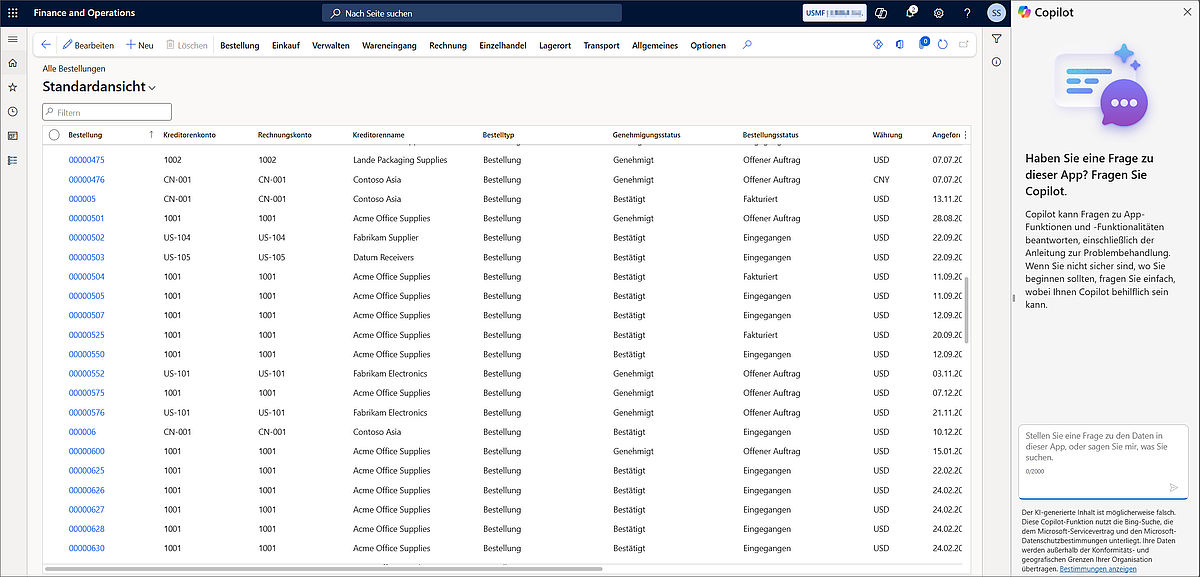
One area where this is particularly noticeable in practice is the onboarding of new employees. Newcomers to accounting or purchasing can ask questions directly within the system instead of interrupting colleagues or searching the manual. The onboarding period is measurably shortened due to fewer questions within the team and faster navigation within the system.
An important note for IT managers: The Sidecar is based on standard Microsoft documentation. In highly customised systems—i.e., those with custom fields, adapted workflows, or third-party solutions—the Copilot is not aware of these customisations and will therefore reach its limits. It works reliably for standard processes, but for highly configured environments, it is a supplementary tool, not a complete replacement for internal documentation.
Technically, the Sidecar is completely decoupled from the ERP front end. This means Microsoft can continuously improve and expand the AI features without requiring an ERP update. For IT managers, this is a key detail, as the AI evolves without compromising the stability of the running system.
Workflow history summary: approval processes at a glance
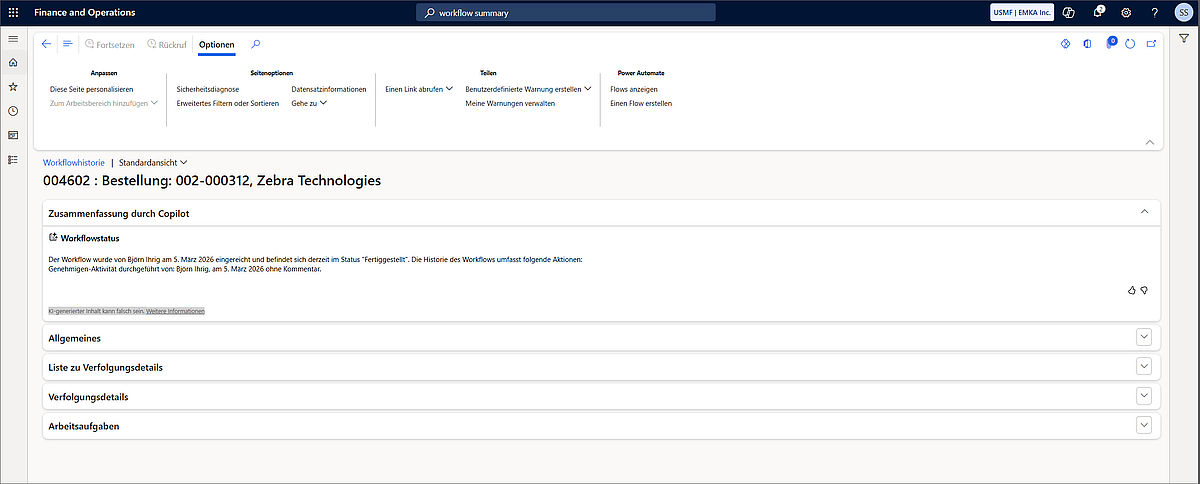
Approval processes are part of everyday life in every company, yet they take a surprising amount of time. To access information about all previous steps in the process, your employees often have to scroll endlessly through the relevant records.
The workflow history summary handles this automatically. Copilot analyses the entire approval history of a process and summarises it in just a few sentences. Instead of reading pages of logs, the user gets a concise, easy-to-understand summary and can get right back to work. This is a real time-saver, especially for managers who make multiple approval decisions every day.
Immersive Home: the AI-powered home screen
The first thing you usually see when you log into the ERP system is the dashboard. This is now complemented by Immersive Home: a new AI-powered home screen that transforms the traditional data view into an active decision-making hub.
The AI analyses your role, your frequent actions, and ongoing agent activities, and uses this information to prioritise the most relevant tasks for the moment. Pending approvals, critical notifications, and recommendations are consolidated in one central location, eliminating the need to search manually across different modules.
AI summaries: understanding data, not just seeing it
Dynamics 365 stores a massive amount of operational data. Reading this data is one thing; understanding it is another. Copilot summaries bridge that gap.
The AI analyses data from the system in real time and generates context-specific summaries for customers, suppliers, products, journals, and orders. In the Collections workspace, for example, the administrator can see payment history, overdue items, risk assessments, and specific collection recommendations at a glance, without having to run a single query. Similarly, before a supplier meeting, a buyer can access a summary of order history, delivery reliability, open invoices, and complaints in seconds—all in one place, directly within the system. This reduces the time spent searching and speeds up decision-making in day-to-day work.
The key difference from a traditional report: Copilot interprets the data rather than merely presenting it, thereby providing a genuine basis for decision-making.
A practical note: The quality of the summaries depends directly on the quality of the underlying data. Incomplete master data or inconsistent transaction histories produce incomplete summaries. Anyone aware that their own database has gaps should address this before implementation. The AI can only summarise what is available in the system.
Anomaly detection in Dynamics 365: identifying issues before they arise
There are problems that can be identified early on if you know where to look. The ERP system usually contains the warning signs, but they get lost in the flood of data. This is where Copilot steps in as an attentive observer.
For example, it detects unusual posting patterns in journals, identifies risks in picking processes and warehouse workloads, and alerts you when spikes in demand indicate historical trends or seasonality. This happens in real time and without any manual effort. In this way, the AI continuously analyses data in the background and highlights anomalies before they become real problems.
Specifically, Copilot detects, for example, entries made outside regular business hours, unusually high individual amounts for certain vendors, or deviations from seasonal patterns. These are signals that are easily overlooked in day-to-day operations but can indicate data errors or discrepancies.
This has a practical side effect, especially for companies that undergo regular audits: those who identify anomalies early and document them transparently will have significantly less to explain at the next audit.
What AI agents are already available in Microsoft Dynamics 365 Finance & Supply Chain Management?
The first autonomous AI agents are already available in Dynamics 365 or are in a production-ready preview. They prepare, organise, and execute tasks, while final decisions remain with your employees.
For Microsoft Dynamics 365 Finance, the Account Reconciliation Agent is an AI agent that continuously automates account reconciliation and identifies discrepancies early on. We explain exactly how the agent works and what impact it has on the closing process in detail in our article on the Account Reconciliation Agent.
In the area of Supply chain management, there is already a practical use case with the Supplier Communications Agent. It handles communication with suppliers, processes incoming emails, and prepares changes directly in the system for review. You can learn how this changes day-to-day work in purchasing in our article on the Supplier Communications Agent.
Conclusion: from ERP to an AI-powered decision-making tool
With everyone talking about AI these days, the question is no longer whether AI belongs in your business. It’s already here. The question is whether you’re making use of it.
AI in ERP systems is no longer a promise for the future—it’s a reality. Copilot and AI agents turn Microsoft Dynamics 365 Finance & Supply Chain Management into a tool that actively thinks along with you, prioritises tasks, and lightens your workload. Intelligent summaries, anomaly detection, and autonomous agents ensure that routine tasks are automated, decisions can be made faster, and your team can focus on the tasks that truly add value.
The potential is already there in your system. It’s just waiting to be tapped. For mid-sized companies in particular, the greatest value is created where AI specifically addresses operational bottlenecks—such as in accounting, procurement, or the analysis of business data.
If you’d like to learn more about the AI features in your Microsoft Dynamics ERP, feel free to contact us via our contact form, and we’ll work together to identify where untapped potential lies.